

Skip to content

Nonprofit event registration

Nonprofit event registration and attendee check-in

Give attendees a place to register and your team a clear arrival workflow. Plan free community events, member conferences and volunteer gatherings with registration records, capacity and QR check-in.

Verified nonprofit Free: up to 3 events in your workspace, 150 attendees per event, 3 team seats. Nonprofit rates require eligibility verification. Paid tickets require your organization’s approved live Stripe Connect account. Site fees and Stripe processing fees apply.

See the current software

Preview the registration path before inviting your community.

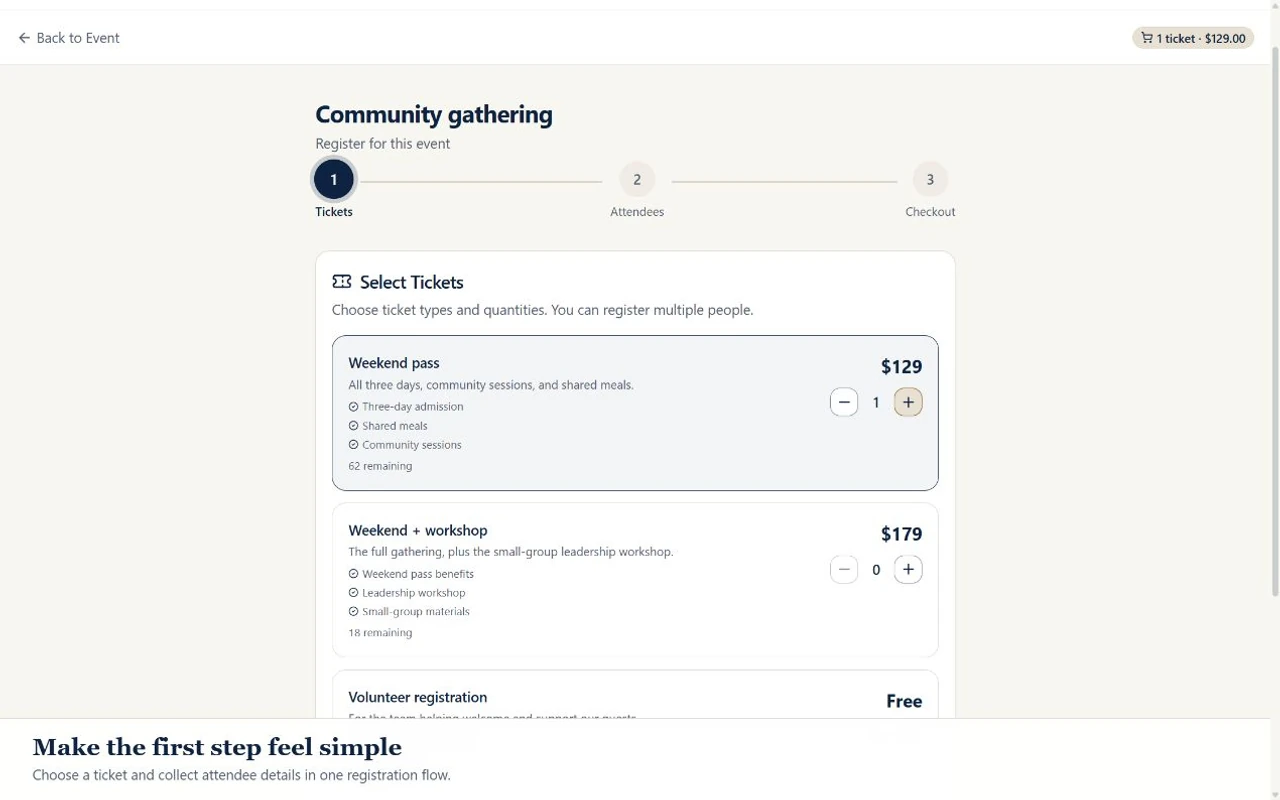
Choose sample tickets and continue to attendee details in the current public registration interface. The recording uses fictional records and stops before an order or payment is submitted.

Inside ADGEventsSample workspace
Actual ADGEvents registration screen showing ticket choices for a fictional community gathering
From ticket choices to attendee details.Choose sample tickets and continue to attendee details. No registration or payment is submitted.

Tools for the work you need to do

Select and pay for an eligible subscription through live Stripe checkout in Settings → Billing. Enterprise billing and support terms require a separate agreement. Paid tickets require your organization’s approved live Stripe Connect account. Site fees and Stripe processing fees apply. Online event and trip donations require your configured live organization Stripe account; cash/check gifts can also be recorded. Donation acknowledgments are not tax receipts. Manage payment setup in Settings → Organization → Payments.

An event page with a clear next step

Publish the event description, date, location and registration choices together. Explain who should attend, what to bring and where to find accessibility or arrival information. You control the event content your audience sees.

Registration types and capacity

Configure ticket types and event capacity to match your program. Separate registration choices where your event calls for them, and test capacity rules with a small free event before opening registration to your community.

Information your team can act on

Use supported registration and form fields to gather the details needed to run the event. Assign staff to review submissions and handle changes. Collect only necessary information and use designated sensitive fields for supported sensitive traveler data.

QR check-in at the door

Authorized event staff can use attendee QR check-in and registration records to manage arrivals. Rehearse scanning and attendee lookup on the devices and network you will use, and prepare a controlled contingency for connectivity problems.

Attendance and follow-up

Review registration and attendance records after the event. Export supported data when your team needs to reconcile it with another system. General CRM and communication tools are separate workflows; verify recipients and consent before sending outreach.

Live paid registration

Setup required

Live paid ticket checkout requires an approved Stripe Connect account. Complete your organization’s business verification and payout setup before opening paid registration. A separate Donations tab accepts gifts through your configured live organization Stripe account; payment acknowledgments are not tax receipts.

A practical workflow for your team

  1. Step 1

    Before you publish

    Set the date and time zone, venue, capacity and free registration choices. Add practical arrival instructions and identify the staff member responsible for registration questions.

  2. Step 2

    Before you invite everyone

    Run a sample registration from a phone. Confirm the record appears in the right organization, review the attendee details, and scan the QR code with an authorized staff account.

  3. Step 3

    After doors close

    Review attendance, resolve duplicates or unanswered questions, and decide what to retain. Transfer supported records to your existing donor system only after checking field mappings and permissions.

A clear starting point.

Frequently asked questions

Can a nonprofit offer free event registration?

Yes. Verified nonprofit Free: up to 3 events in your workspace, 150 attendees per event, 3 team seats. Nonprofit rates require eligibility verification. Check the pricing table against your expected attendance.

Can attendees register from a phone?

The public event and registration interfaces are designed for mobile use. Test your own event content, form length and registration choices on a phone before sending invitations.

Can we accept paid registrations or donations today?

Paid registrations require approved live Stripe Connect setup. Enable event or trip donations and configure your organization’s live Stripe account to accept online gifts without requiring an account or registration. Staff can also record cash/check gifts. Online donors receive a payment acknowledgment, not a tax receipt.

Can we assign named seats at gala tables?

Dedicated gala table seating and sponsor-managed named-seat assignment are not yet available. Ticket types and event units are not a table-seating system.

How does registration connect to our donor CRM?

Supported contact and registration exports can be reviewed and mapped by your team into your donor CRM. Direct donor-CRM synchronization is not yet available.

Plan your next program with the right tools.

Compare the available features and plan limits, or talk to sales about your program before choosing a plan.

Verified nonprofit Free: up to 3 events in your workspace, 150 attendees per event, 3 team seats. Nonprofit rates require eligibility verification. Paid tickets require your organization’s approved live Stripe Connect account. Site fees and Stripe processing fees apply.