Fundraising for events and trips
Fundraising software that stays connected to your event or trip
Manage goals, supporter gifts, pledges, matching and follow-up in a shared Donations workspace. Show confirmed progress while keeping promises, benefits and noncash support clear.
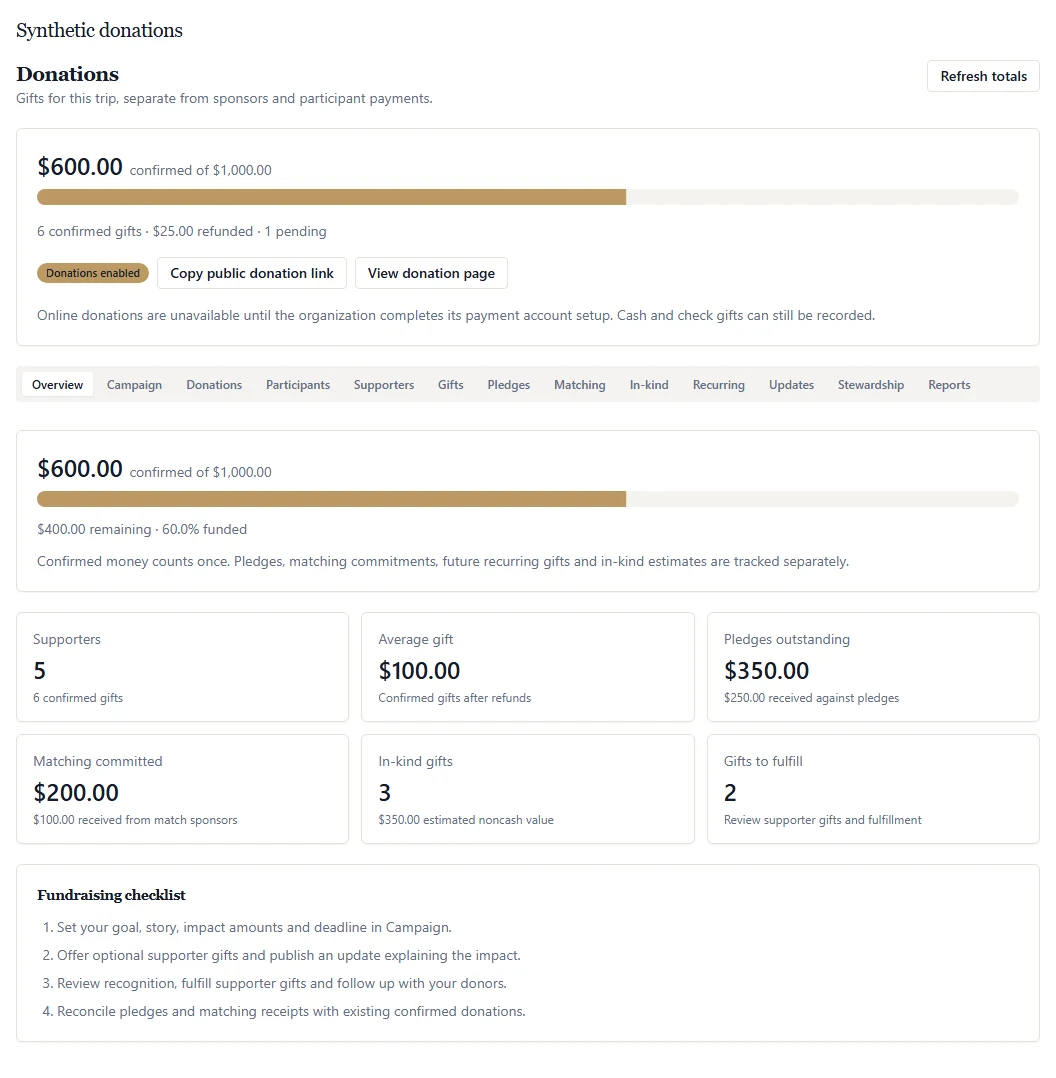 Open full-size product screenshot ↗
Tools and availability
Pay for your subscription through live Stripe checkout in Settings → Billing. Paid tickets require your organization’s approved live Stripe Connect account. Event and trip donations use your configured live organization Stripe account; cash/check gifts can also be recorded. Manage payment setup in Settings → Organization → Payments. Donation acknowledgments are not tax receipts.
Campaign goals with a clear basis
Set a campaign story, cover image, deadline, milestones and suggested impact amounts. Progress uses confirmed gifts less refunds. Paused or closed campaigns stop new checkout; existing recurring gifts continue until canceled. Pledges, future installments, matches owed and in-kind estimates never inflate received totals.
One-time and recurring giving
Setup requiredOffer a public donation link with suggested or custom amounts and no account or registration requirement. Enable monthly or yearly giving after your organization’s live Stripe and recurring-provider setup is complete. Donors can recover private management access and manage future gifts through the provider.
Pledges and matching commitments
Record pledge schedules and link actual gifts to their outstanding balances. Configure a matching challenge with its dates, ratio and cap, or track an employer-match request. Received matching money requires an actual linked gift; employer requests are tracked rather than submitted automatically.
Supporter recognition and thank-you gifts
Let donors keep a gift private, choose an anonymous or public display name, hide the amount, and add an honor or memory tribute. Staff moderate the supporter wall. Optional thank-you gifts include contribution thresholds, benefit values, stock limits and recorded fulfillment.
Cash, checks and in-kind support
Record real cash/check gifts with their dates and allocations. Track in-kind items and optional organizer-estimated values separately from money. Export authorized donation records for reconciliation; received totals do not deduct processor fees or event costs.
Acknowledgments and staff stewardship
Setup requiredA configured, verified sender can process payment acknowledgments for confirmed gifts. Staff can review delivery states, add stewardship notes, assign follow-up tasks and publish campaign updates. A published update does not send a broadcast or enroll supporters in marketing.
A practical workflow for your team
Step 1
Prepare the campaign and its boundaries
Enable Donations inside the event or trip. Set the goal and story, review staff permissions, choose recognition and gift options, and approve participant allocations where applicable.
Step 2
Verify giving before inviting supporters
Check the live organization payment account, recurring setup and acknowledgment sender. Review the public page from a donor’s perspective and confirm what is private, public and optional. Keep separate arrangements for any required tax documentation.
Step 3
Reconcile receipts and follow through
Review confirmed gifts and refunds, record offline receipts, and resolve outstanding pledges, matches and gift fulfillment. Export permitted records and reconcile processor fees and event costs in your finance process.
Frequently asked questions
- Can events and trips use the same fundraising tools?
- Yes. Events and trips use the shared Donations workspace for campaigns, goals, gifts, pledges, matching, recurring giving, updates and stewardship. Trips can also have approved participant fundraising allocations.
- What counts toward a fundraising goal?
- Confirmed live online gifts and recorded cash/check gifts count after refunds or voids. Pending and sandbox payments, unpaid pledges, future recurring installments, matches still owed and in-kind estimates do not count as received money. Participant allocations are included once in the trip total.
- Can donors give without an account?
- Yes. A public donation link lets a supporter choose an allocation, a suggested or custom amount, and available giving options, then enter their name and email and continue to provider-hosted checkout. Event or trip registration is not required.
- Can we offer supporter gifts or public recognition?
- Yes. Optional thank-you gifts have contribution thresholds, available options, stock and fulfillment records. Donors can decline a benefit. Public recognition is opt-in and staff moderated; private identity and contact details are not published on the supporter wall.
- Are online and recurring payments ready without setup?
- No. Online giving requires your organization’s configured live Stripe account. Recurring enrollment requires the appropriate payment-provider setup, and acknowledgment email requires a verified sender. The organization should verify actual payment, refund, recurring and email behavior before inviting donors.
- Does the platform issue tax receipts or calculate net fundraising profit?
- No. Payment acknowledgments do not certify charitable status or tax deductibility. Received totals deduct refunds but not processor fees or event costs. Dedicated donation tax receipts, silent-auction processing and direct donor-CRM synchronization are not available.
Related solutions
Mission-trip management
Coordinate travelers, rooming, itineraries and approved participant fundraising.
The work behind a fundraiser
Bring the gala schedule, volunteers, sponsors and preparation tasks together.
Nonprofit plans and fees
Review verification, access and published limits before choosing your workspace.
Ready to run it on ADGEvents?
Compare the available features and plan limits, or talk to sales about your program before choosing a plan.