

Skip to content

Fundraising event operations

Fundraising event planning software for the work behind your gala

Coordinate your charity event team, sponsor commitments, registration and schedule. Accept donations through a public link, record cash/check gifts and review confirmed totals in a separate Donations tab.

See the current software

Give the committee a shared view of the event.

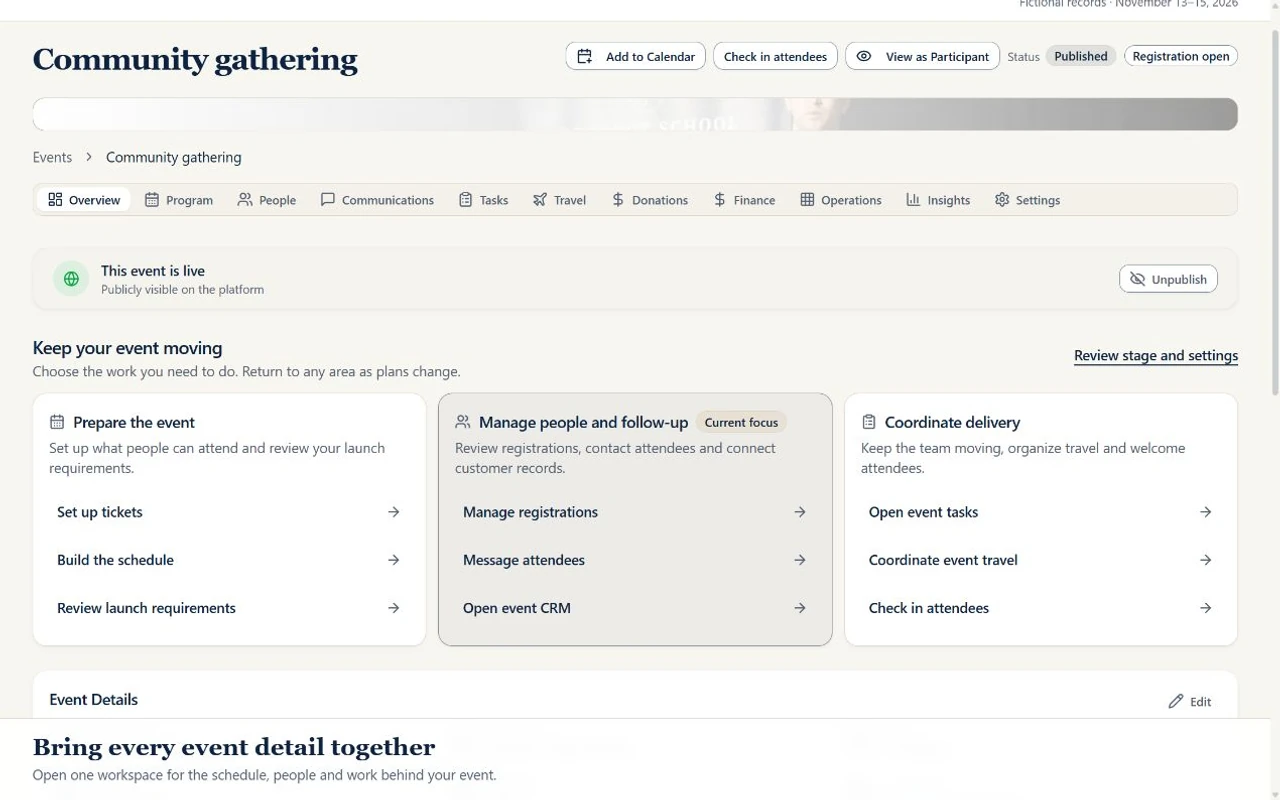
See the current event overview, sessions, people and team assignments. These event tools support your fundraiser’s delivery; donation records and received totals are maintained separately in Donations.

Inside ADGEventsSample workspace
Actual ADGEvents event workspace showing a fictional community gathering
One event. A shared plan for the team.Open a sample event, review its schedule and people, then inspect an assigned task. Actual interface with fictional records.

Tools for the work you need to do

Select and pay for an eligible subscription through live Stripe checkout in Settings → Billing. Enterprise billing and support terms require a separate agreement. Paid tickets require your organization’s approved live Stripe Connect account. Site fees and Stripe processing fees apply. Online event and trip donations require your configured live organization Stripe account; cash/check gifts can also be recorded. Donation acknowledgments are not tax receipts. Manage payment setup in Settings → Organization → Payments.

An accountable event plan

Assign preparation tasks, deadlines and owners. Keep venue decisions, vendor details and program requirements in the event workspace so staff and committee leads can see the next action instead of piecing it together from separate messages.

Budget and financial records

Review confirmed donations minus refunds alongside your event budget. Donation totals exclude pending payments and sandbox transactions. Your finance team still reconciles processor fees, event costs and external proceeds before reporting net fundraising revenue or tax treatment.

Sponsor commitments you can review

Record sponsor deliverables such as a logo placement, signage or a program mention with due dates, notes and fulfillment status. Staff confirm whether each benefit was delivered. The checklist does not automatically verify sponsor exposure.

Guests and volunteer teams

Configure free registration and ticket types, review attendee records, and coordinate volunteer applications, shifts and check-ins. Dedicated table seating, sponsor-managed guest lists by named seat and gala table sales are not yet available.

A program the team can prepare for

Schedule sessions and activities, connect preparation tasks and assign the people responsible. Review the sequence with your host and volunteer leads, and share your event’s public donation link during an appeal.

Event and trip donations

Setup required

Enable donations, set a goal and suggested amounts, and share a public link. Online checkout uses your configured live organization Stripe account and sends a payment acknowledgment. Staff can record cash/check gifts, review donor records and export with permission. Approved trip participants can fundraise without changing their payment balances.

Tax receipts and auctions

Not yet available

Donation acknowledgments do not certify tax deductibility. Donation tax receipts, silent-auction bidding, winner allocation and auction checkout are not yet available.

A practical workflow for your team

  1. Step 1

    Separate event costs from fundraising assumptions

    Record your event budget, expected attendance and sponsorship commitments. Have your finance team define how donations and external provider fees will be reconciled.

  2. Step 2

    Prepare the committee and suppliers

    Give every venue, catering, sponsor and program task an owner and due date. Check your donation link and organization payment setup. Confirm any separate auction or tax-receipt process and who handles guest questions.

  3. Step 3

    Rehearse, deliver and reconcile

    Test attendee check-in, review volunteer shifts and rehearse the program schedule and team responsibilities. After the event, verify sponsor benefits, review attendance and reconcile outside transaction reports before reporting results.

A clear starting point.

Frequently asked questions

Is this fundraising software or event planning software?

ADGEvents combines event and trip planning with a shared Donations tab. Accept online gifts through your configured live organization Stripe account, record cash/check gifts and track fundraising goals. Dedicated donor-CRM synchronization, donation tax receipts and auction processing are not available.

Can we use it for a charity gala?

Yes, for tasks, budgets, sponsors, registration, volunteers, schedules and donations. Use separate tools for dedicated gala table seating, donation tax receipts and auctions.

Can we sell tickets to our next fundraiser?

Yes, after your organization completes live Stripe Connect onboarding and Stripe approves payments and payouts. Configure your ticket prices and capacity before opening registration. Sandbox transactions are not real ticket payments. Free registration is also available.

Does it calculate our net funds raised?

Donation totals show confirmed live online and recorded cash/check gifts minus refunds or voided gifts. A participant allocation is included once in the trip total and also shown in that participant’s progress. These totals do not deduct processor fees or event costs. Your finance team remains responsible for final fundraising and accounting reports.

Where should a small nonprofit start?

Start with a written event goal, a budget owner, a task list and a guest registration plan. Use the free nonprofit event planning checklist to assign responsibilities, then test a small free event in ADGEvents before committing the full program.

Plan your next program with the right tools.

Compare the available features and plan limits, or talk to sales about your program before choosing a plan.