Mission-trip coordination
Mission trip management software for travelers, fundraising and the work around departure
Coordinate traveler records, rooming, itineraries and tasks alongside approved participant fundraising. Keep the trip plan and supporter relationships in one organization workspace.
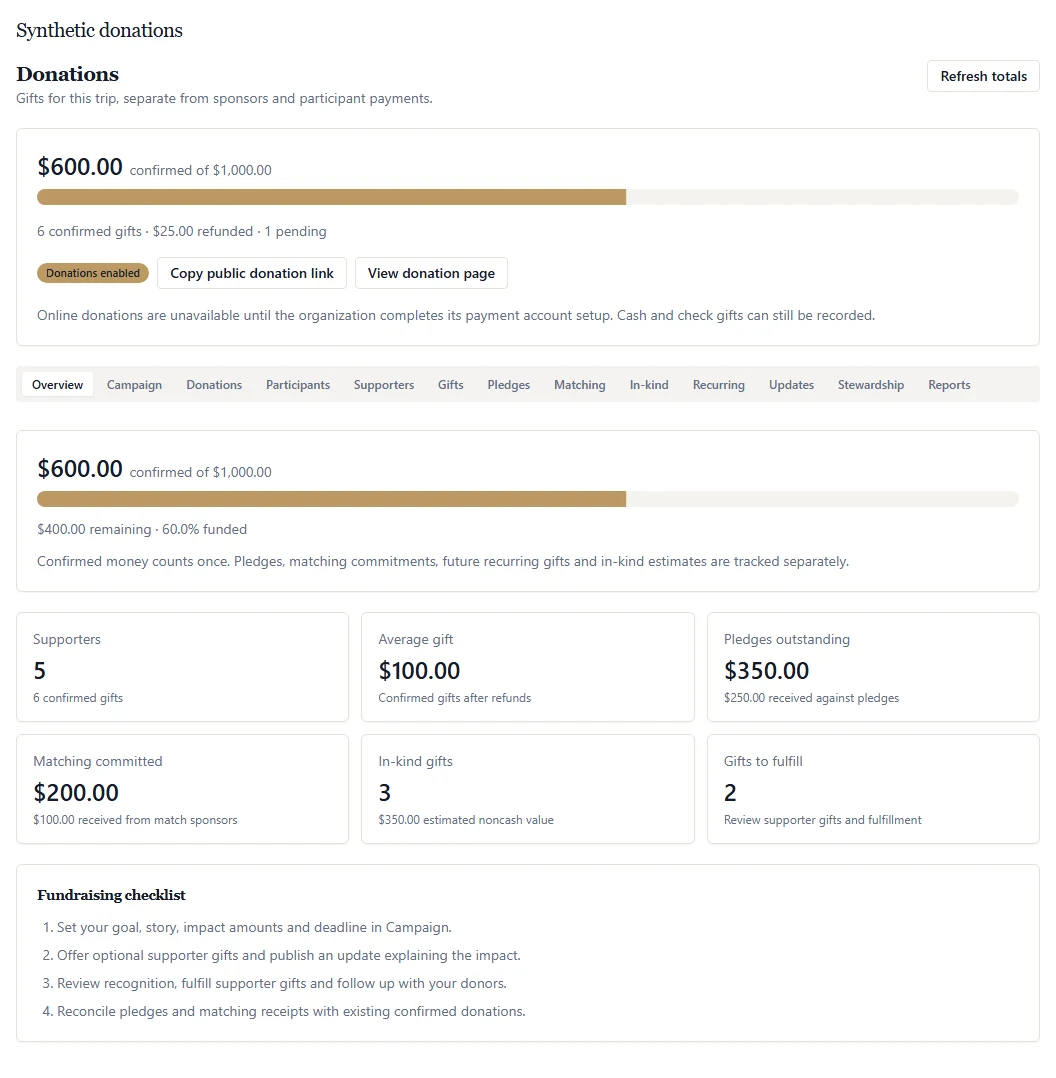 Open full-size product screenshot ↗
Tools and availability
Pay for your subscription through live Stripe checkout in Settings → Billing. Paid tickets require your organization’s approved live Stripe Connect account. Event and trip donations use your configured live organization Stripe account; cash/check gifts can also be recorded. Manage payment setup in Settings → Organization → Payments. Donation acknowledgments are not tax receipts.
A shared trip plan
Keep traveler records, accommodation, room assignments, transport and activities together. Share a readable itinerary with participants while staff maintain the planning details and confirm arrangements with providers.
Approved participant fundraising
Approve the participants who can fundraise, set allocation labels and review goals. An approved participant can update their own story and goal and share an allocation link. Participant access does not include private donor details.
General and participant gifts, counted clearly
Supporters can choose the general trip fund or an enabled participant allocation. A participant gift counts once in the trip total and also appears in that participant’s progress. Donations do not pay or reduce the participant’s trip balance.
Public giving and offline records
Setup requiredShare a donation link that requires no donor account or trip registration. Online giving uses your configured live organization Stripe account. Authorized staff can record actual cash/check gifts, track pledges and review confirmed amounts after refunds.
Readiness with appropriate access
Coordinate traveler information requests, documents and departure tasks with assigned staff. Supported sensitive traveler fields have designated protection and reveal controls; ordinary notes and uploaded documents use different access controls. Confirm destination requirements with the appropriate authorities.
Budgets and follow-up around the journey
Maintain the trip budget, recorded expenses, tasks and itinerary as the plan develops. Review fundraising progress separately from participant charges and supplier costs. CRM and stewardship tools give inquiries and supporter follow-up a named owner.
A practical workflow for your team
Step 1
Start with the trip and its responsibilities
Add your dates and travelers, define staff access, and assign preparation tasks. Record confirmed supplier arrangements and the information still needed before departure.
Step 2
Approve fundraising before sharing
Set the campaign story, currency and goal. Approve participant allocations, decide which giving choices to offer, and verify the organization payment and acknowledgment setup before inviting supporters.
Step 3
Keep readiness and received funds in view
Review outstanding traveler tasks and share itinerary updates. Reconcile confirmed gifts, refunds and recorded cash/check receipts. Keep pledges and expected matches visible as commitments rather than money already received.
Frequently asked questions
- What does mission trip management software organize?
- It gives coordinators a place for travelers, rooming, itineraries, tasks, budget records and fundraising. ADGEvents connects those workflows within an organization workspace. Your team still approves participants, confirms supplier arrangements and checks travel requirements.
- Can a supporter give to a specific mission-trip participant?
- Yes. Organizers approve and enable participant fundraising allocations. Supporters can choose an allocation or the general trip fund through the public donation page without creating an account or registering for the trip.
- Does a participant donation also pay their trip balance?
- No. Donations and participant payments are separate. A participant gift appears once in the trip’s received total and in that participant’s fundraising progress, but it does not change what the participant owes for the trip.
- Can participants manage their own fundraising pages?
- An approved participant can edit their own fundraising story and goal and share their allocation link. Organizers control approval and public allocation labels. Participants cannot use this access to view private donor records.
- What is required for online mission-trip donations?
- Your organization needs its configured live Stripe account. Recurring giving additionally needs its payment-provider setup, and email acknowledgments need a verified sender. Verify the complete payment, refund and acknowledgment workflow with your organization before inviting supporters.
- Does this include travel booking or donation tax receipts?
- Live in-app flight and hotel purchasing is not available. Record arrangements made with your providers. Donation acknowledgments do not establish tax deductibility, and dedicated donation tax receipts, auction processing and direct donor-CRM synchronization are not available.
Related solutions
Ready to run it on ADGEvents?
Compare the available features and plan limits, or talk to sales about your program before choosing a plan.