Events
Build a run of show your whole team can follow
Turn a program into an operating plan with named owners, clear cues, and a worked conference opening you can adapt.
A public agenda tells guests what is happening. A run of show tells the delivery team what needs to happen for that agenda to work. It includes the small transitions: opening the doors, checking microphones, moving a speaker into place, and handing responsibility to the next person.
Build the run of show around actions and handoffs. The sample below covers the opening of a fictional community conference. It is an editable planning example, not a report from a customer event.
Give every row a job
For each row, specify the time, the action, the owner, and the place. Add a cue or dependency when the action must wait for something else. “Welcome” is a session label. “Host begins welcome after the stage manager confirms the microphone” describes an operational handoff.
Use roles that your team recognizes. If two people are both called “producer,” distinguish their responsibilities in the contact sheet. A long list of names without clear ownership is still ambiguous.
Decide which time is fixed and which is approximate. A venue access time may be a constraint you must honor; a conversation break may have flexibility. Confirm constraints with the relevant people instead of relying on a generic template.
Work through the first hour
| Time | Action | Owner | Place | Cue or dependency |
|---|---|---|---|---|
| 8:30 a.m. | Welcome desk ready | Welcome lead | Entrance | Roster and signage reviewed |
| 8:45 a.m. | Check microphones and playback | Audio lead | Main hall | Speakers available for check |
| 8:55 a.m. | Confirm room is ready | Stage manager | Main hall | Welcome and audio leads report ready |
| 9:00 a.m. | Begin welcome | Host | Stage | Stage manager gives agreed cue |
| 9:20 a.m. | Close introduction and reset | Host + stage manager | Stage | Next speaker in position |
| 9:30 a.m. | Begin first session | Session speaker | Stage | Introduction complete |
The ten-minute transition is an example choice. Review the actual needs of your room, speakers, and equipment before copying it. Include the work of getting ready, not just the moment the next session starts.
Rehearse the handoffs aloud
Bring the owners together and read the opening sequence. Ask each person: “What tells you to begin?” and “Who needs to know when you are done?” If either answer is unclear, the row needs another pass.
For a delayed opening, decide who can approve an adjustment and who communicates it. Avoid having every team edit their own copy of the timing. The running order should identify the current plan, while changes follow an agreed process.
If your team uses both a digital view and printed sheets, put the revision date on the printout. Review the final distributed version before doors open. A printed copy remains a snapshot.
Make the document quick to scan
Keep action names short and specific. Use headings for days or program blocks, and make owner and location columns consistent. The W3C headings guidance describes how heading structure supports understanding and navigation. A digital running order should carry meaning through its structure, not rely only on color.
Color can help distinguish categories, but include written category names. When someone prints in grayscale or cannot distinguish the colors, the task should still be understandable.
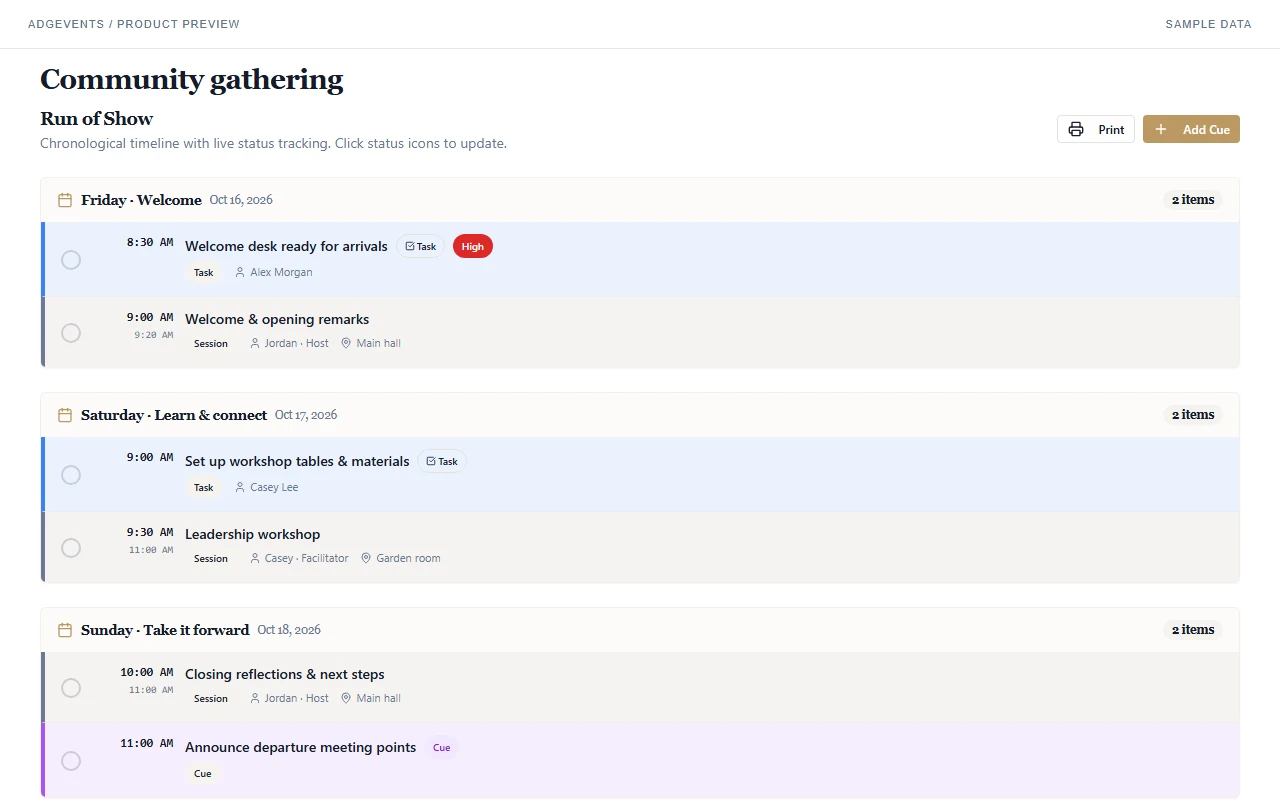
This actual ADGEvents interface is populated with sample data. The run-of-show view combines sessions, dated tasks, and cues. Review assignments and timings with your team; adding a row does not confirm that a person has accepted the responsibility.
Copy the team-readiness checklist
- Each operational row has a time, action, owner, and location.
- Dependencies and start cues are explicit.
- Provider and venue constraints have been confirmed.
- Transitions allow for the actual room and equipment requirements.
- Owners know how to report a delay or completion.
- A person is authorized to approve timing changes.
- Category meaning remains clear without color.
- The team knows which version is current.
- The opening sequence has been walked through with its owners.
Use the existing free run of show template, including its CSV download. To connect the running order to registration and the rest of the event, explore ADGEvents for event organizers.