Faith
A church retreat planning timeline: from first meeting to arrival day
Work backward from arrival day with a practical twelve-week example, clear owners, and a checklist your ministry team can adapt.

A retreat begins with a reason to gather. Before comparing venues or writing the invitation, finish one sentence together: “We want people to leave this weekend with…” That answer will help you decide what belongs in the schedule, what can wait, and where the team should spend its attention.
The timeline below is an illustrative twelve-week plan for a two-night, 48-person adult retreat. It is a planning example, not a minimum lead time or a claim about a real ADGEvents customer. Venue deadlines, participant needs, and your organization’s policies may require an earlier start.
Start with three decisions
Choose a planning owner, a purpose, and the decisions that need approval. The owner does not need to do every task. Their job is to make the next decision visible and bring unresolved items to the right person.
For our example, the purpose is connection across three ministry groups. The team chooses two shared meals, one facilitated conversation, and unstructured time rather than filling every hour. One person owns the venue relationship, another registrations, and a third the program. The ministry lead approves the budget and the final invitation.
Write those responsibilities beside the decisions. “Confirm meals” is incomplete until someone knows who will confirm them, with whom, and by when.
Work backward from arrival
| When | Decision or deliverable | Example owner | Ready when |
|---|---|---|---|
| 12 weeks before | Purpose, budget boundaries, dates | Ministry lead | Approvals recorded |
| 10 weeks before | Venue and room options | Logistics lead | Provider confirms arrangements |
| 8 weeks before | Registration and invitation | Registration lead | A sample signup has been reviewed |
| 6 weeks before | Sessions and volunteer roles | Program lead | Each role has an owner |
| 4 weeks before | Rooming and participant requests | Logistics lead | Open questions have follow-up dates |
| 2 weeks before | Arrival guide and team briefing | Planning owner | Details checked with providers |
| 2 days before | Latest roster and welcome materials | Welcome lead | Team can identify the current version |
| Arrival day | Welcome desk and first handoffs | On-site lead | Roles and escalation contact are clear |
In this example, registration closes before the venue’s final room-count deadline. Work out that relationship using the provider’s actual agreement; do not copy a cutoff from another retreat without checking it.
Make the final week about confirmation
Separate a missing decision from a routine reminder. “Confirm dietary request with the caterer” is a task; “send everyone the same old planning thread” is unlikely to settle it. Maintain a short list of unresolved questions with a named owner and a next check date.
The participant arrival guide should answer: where to go, when to arrive, what to bring, what the first evening looks like, and whom to contact. Keep the staff running order separate from the participant version.
Descriptive headings help readers understand and navigate a page, including through assistive technology. The W3C headings tutorial explains this structure. Apply the same principle to an arrival guide: use “Where to park” instead of a vague heading such as “More information.”
Copy this arrival checklist
- Venue details and arrival instructions checked with the venue.
- Rooming questions resolved or assigned to a named follow-up owner.
- Participant requests shared only with the people who need to act on them.
- Welcome desk has the current registration list.
- Volunteers know their first assignment and backup contact.
- First session, meal, and transition times agree across the itinerary and team plan.
- A final version date appears on any printed guide.
- The team has agreed how to communicate a same-day change.
Download the retreat timeline worksheet. It contains the example rows above and can be edited in a spreadsheet.
Give the team a shared running order
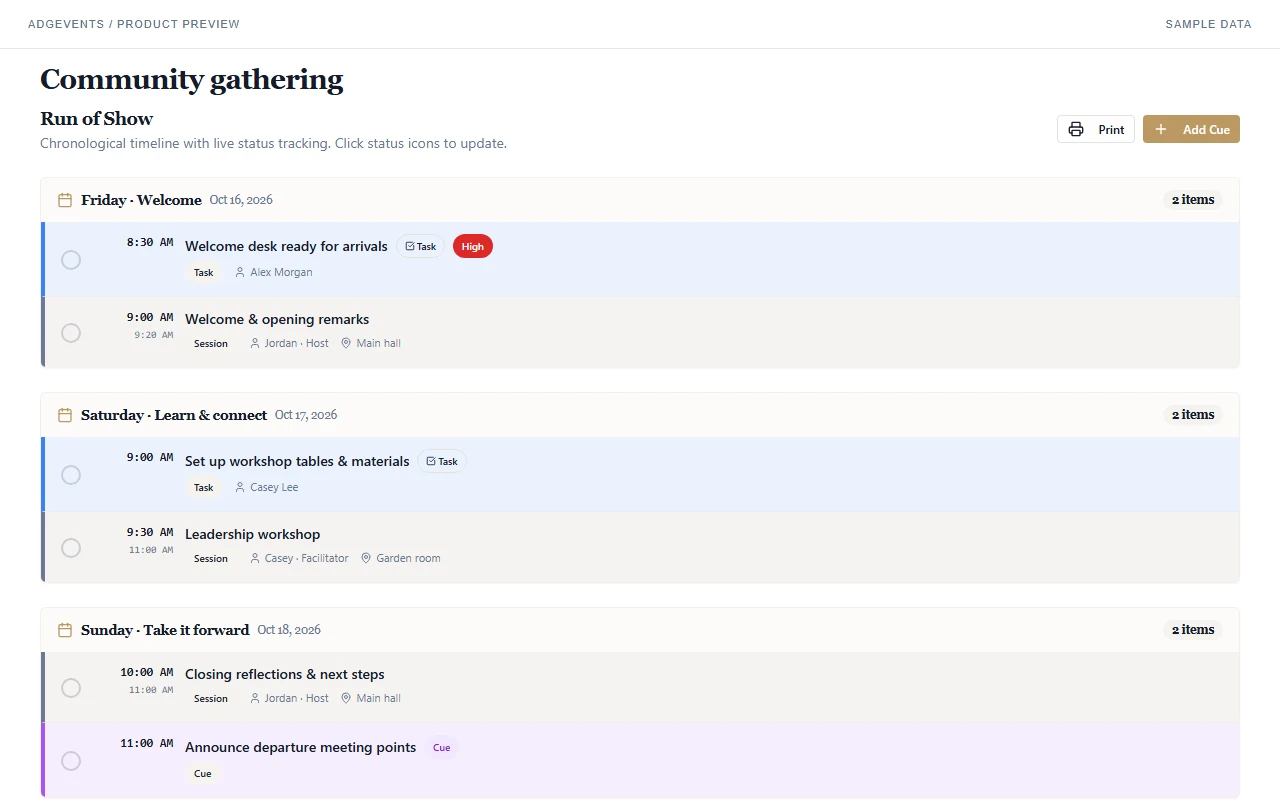
This actual product capture uses sample data. ADGEvents brings sessions, tasks, and cues into a run-of-show view. Use it to review the day with your team; it does not replace the approvals or provider confirmations in your plan.
Explore ADGEvents for churches and ministries, or start with the broader nonprofit event checklist. Free and nonprofit plan limits are listed on pricing; nonprofit eligibility requires verification.