Skip to content

For group travel teams

Group travel management software for organizers

One plan for the people, rooms and days ahead.

Coordinate traveler records, rooming arrangements and a shared itinerary. Keep the work around a group trip connected while your team arranges and confirms supplier bookings.

Commercial travel coordination: included on Business or Enterprise plans. Verified nonprofit travel coordination: included on Business or Enterprise plans. Commercial: available as a paid extra tool on Starter or Pro; the base subscription is required. Verified nonprofit: available as a paid extra tool on Starter or Pro; the base subscription is required. Free accounts do not include the travel toolkit.

Create a free account for core event registration. Expanded tools require the appropriate base plan or an available extra tool.

Inside ADGEventsSample workspace
Actual ADGEvents itinerary showing fictional arrival, accommodation and activity records
The next stop, in one shared itinerary.Explore the timeline and category views of a fictional group itinerary. No travel booking or payment is made.

Turn arranged travel details into a plan your group can follow.

01

Prepare the traveler records

Keep group details and preparation work together. Assign the next follow-up so missing information has someone responsible for resolving it.

02

Coordinate rooms with the trip

Maintain accommodation records and rooming arrangements, then reconcile them with your supplier before sharing the final plan.

03

Share the day-by-day itinerary

Bring transport, accommodation and activities into timeline and category views. Give travelers a readable link to the plan your team maintains.

Coordination tools organize arrangements made with your providers. Live in-app flight and hotel purchasing is not currently available. Your team arranges supplier bookings and servicing. Feature access depends on your plan. Feature access also depends on staff permissions. Compare plan availability.

Use the group travel planning worksheets →

Explore the product

See how the work connects.

Select a view to explore. Real interface. Sample data.

Give the next handoff an owner.

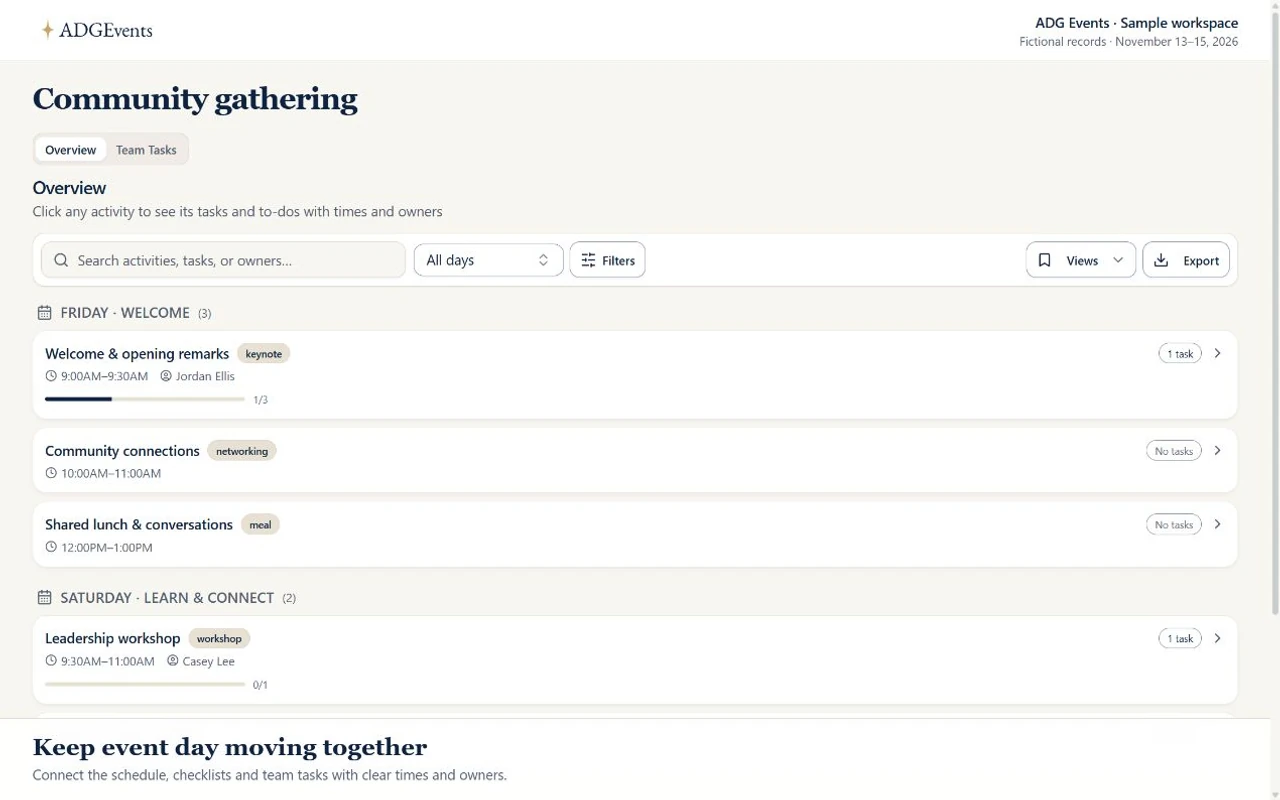
See scheduled activities with their tasks and to-dos. Use the team board to review the owners, deadlines and instructions behind each assignment.

Inside ADGEventsSample workspace
Actual ADGEvents activity overview showing fictional sessions, times and task progress
From the activity to the next assignment.Open a sample activity and its to-dos, then explore the team task board and an assignment’s details. No task is changed.

Sales & Marketing CRM

Carry the conversation into the journey.

Keep group inquiries, contact history, and follow-up tasks together in Sales CRM. Use Marketing CRM to organize traveler audiences and prepare trip updates and future journey invitations.

Explore contacts, campaigns & follow-up →

Eligible base-plan or active CRM extra-tool access, sender setup, and audience consent apply.

A clear starting point.

Questions before you choose your workspace

What does group travel coordination cover?

Maintain traveler records, rooming arrangements, accommodation and transport details, and a day-by-day itinerary. The shared itinerary presents the arrangements your team maintains in timeline and category views. Confirm supplier details before treating the plan as final.

Can I buy flights or hotels inside ADGEvents?

Live in-app flight and hotel purchasing is not currently available. Your team arranges supplier bookings and servicing. The software coordinates your records; it does not replace your supplier or servicing arrangements.

Does a free account include the travel toolkit?

Commercial travel coordination: included on Business or Enterprise plans. Verified nonprofit travel coordination: included on Business or Enterprise plans. Commercial: available as a paid extra tool on Starter or Pro; the base subscription is required. Verified nonprofit: available as a paid extra tool on Starter or Pro; the base subscription is required. Free accounts do not include the travel toolkit.

Can our team keep group inquiries and follow-up together?

Yes. Eligible base-plan or active CRM extra-tool access connects contacts, opportunities, conversation history and assigned follow-up. Sales and Marketing share one CRM purchase. Staff permissions, sender setup, audience consent and applicable limits still apply.

From the field

A little planning goes a long way.

All Field Notes

Practical planning guides for faith communities, travel teams, and event organizers. Explore Field Notes.

Make the plan your own. Browse free guides & templates →

Make room for the moment

Bring your next
gathering to life.

Commercial travel coordination: included on Business or Enterprise plans. Verified nonprofit travel coordination: included on Business or Enterprise plans. Commercial: available as a paid extra tool on Starter or Pro; the base subscription is required. Verified nonprofit: available as a paid extra tool on Starter or Pro; the base subscription is required. Free accounts do not include the travel toolkit.

Create a free account for core event registration. Expanded tools require the appropriate base plan or an available extra tool.