

Build the event plan
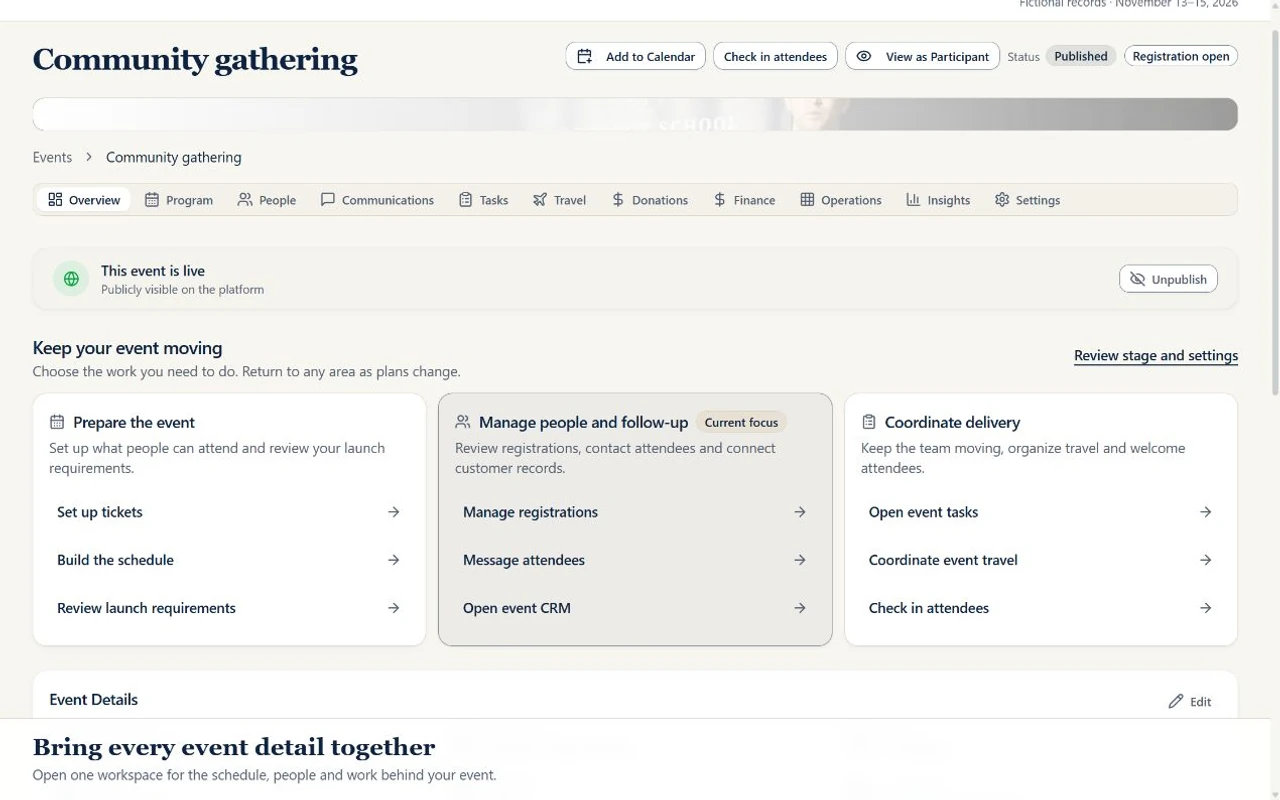
Set up the event, ticket choices and attendee details. Organize scheduled activities, checklists and the people responsible for delivery.
Explore event management →A shared workspace for the work behind the gathering
Plan the event, welcome the people and give the next task an owner. Connect registration, schedules, team responsibilities and follow-up, with group travel tools when your program needs them.
Core event registration has a free starting plan. Choose the appropriate base plan and any available extra tools for Travel or CRM.
Create a free account for core event registration. Expanded tools require the appropriate base plan or an available extra tool.
From planning to follow-through
Set up the event, ticket choices and attendee details. Organize scheduled activities, checklists and the people responsible for delivery.
Explore event management →Review team assignments, owners and deadlines. For programs with travel, maintain traveler records, rooming and day-by-day itineraries through an eligible base plan or active Travel extra tool.
Explore group travel tools →Work from contacts, opportunities, conversation history and follow-up tasks. Prepare relevant outreach through the marketing tools and channels your team configures.
Explore sales and marketing CRM →Explore the product
Select a view to explore. Real interface. Sample data.
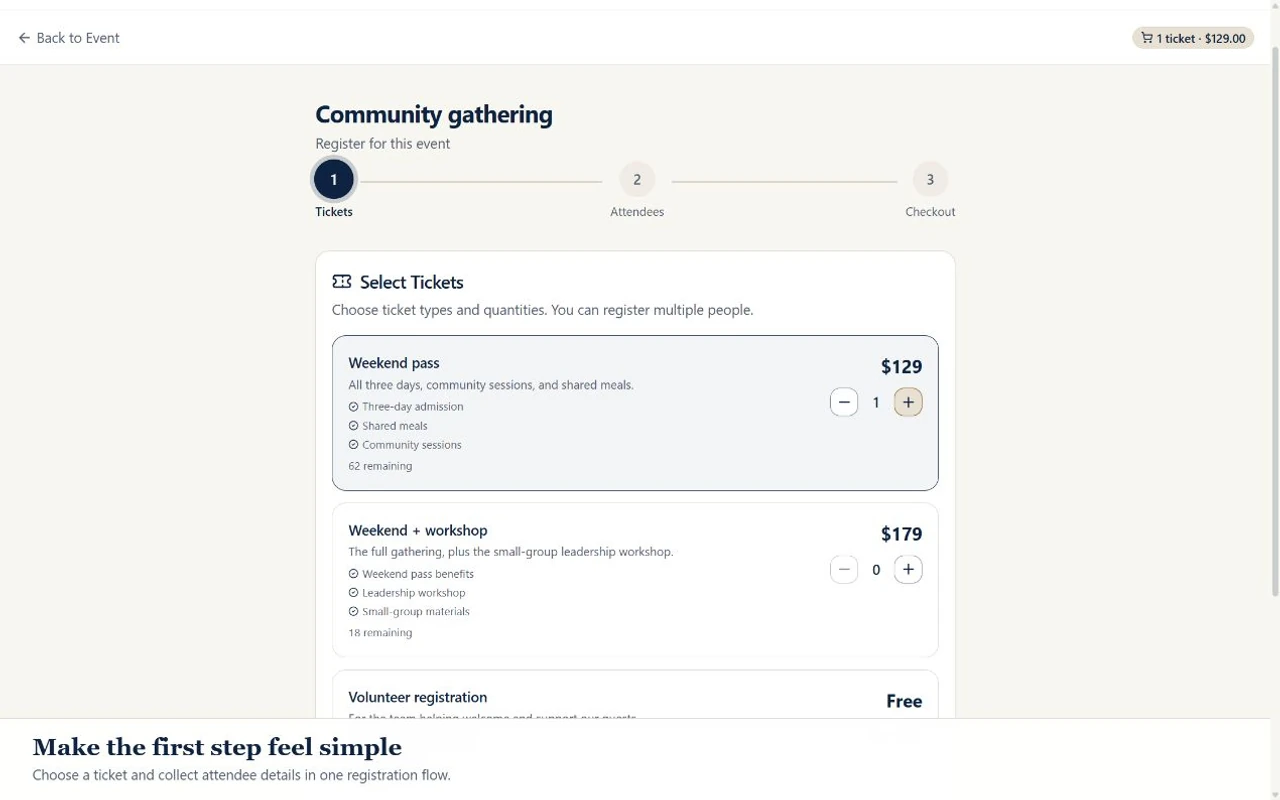
Offer ticket choices and collect attendee details on an event registration page. Keep registration connected to the event your team is delivering.
Sales & Marketing CRM
The details matter. So do the conversations around them. Keep contacts, opportunities, and outreach connected to the people planning your next gathering.
Sales CRM / Personal follow-up
Track an inquiry through your pipeline, open its conversation history, and give the next follow-up an owner and a due date.
Marketing CRM / Community outreach
Work from shared contacts to organize subscribers and segments, prepare campaigns, and reuse the messaging your team has agreed on.
Sending and connected-channel reporting require the relevant setup and access. Review your audience’s consent before sending.
Commercial crm: included on Business or Enterprise plans. Verified nonprofit crm: included on Pro, Business, or Enterprise plans. Commercial: available as a paid extra tool on Starter or Pro; the base subscription is required. Outreach requires eligible base-plan or active CRM extra-tool access, staff permission, configured sender services, verified sender setup, audience consent and applicable limits. Provider usage may cost extra; unlimited sending is not included.
Compare CRM base plans and extra tools →Choose the tools your program needs
Commercial Free: up to 2 events in your workspace, 100 attendees per event, 2 organizer seats. Verified nonprofit Free: up to 3 events in your workspace, 150 attendees per event, 3 organizer seats. Nonprofit rates require eligibility verification.
Expanded sessions, volunteers, sponsors and reporting follow the base plan and any active extra tools. Included capabilities are not charged twice.
Compare event tools and limits →Commercial travel coordination: included on Business or Enterprise plans. Verified nonprofit travel coordination: included on Business or Enterprise plans. Commercial: available as a paid extra tool on Starter or Pro; the base subscription is required. Verified nonprofit: available as a paid extra tool on Starter or Pro; the base subscription is required. Free accounts do not include the travel toolkit. Live in-app flight and hotel purchasing is not currently available. Your team arranges supplier bookings and servicing.
Explore traveler and itinerary tools →Commercial crm: included on Business or Enterprise plans. Verified nonprofit crm: included on Pro, Business, or Enterprise plans. Commercial: available as a paid extra tool on Starter or Pro; the base subscription is required. Outreach requires eligible base-plan or active CRM extra-tool access, staff permission, configured sender services, verified sender setup, audience consent and applicable limits. Provider usage may cost extra; unlimited sending is not included.
Explore CRM workflows →Paid tickets require your organization’s approved live Stripe Connect account. Site fees and Stripe processing fees apply. Online event and trip donations require your configured live organization Stripe account; cash/check gifts can also be recorded. Donation acknowledgments are not tax receipts. Deposits and installment payment plans are available for event registrations on plans with payment tools. Authorized staff must configure an active event payment plan and approved live Stripe Connect setup.
A clear starting point.
ADGEvents brings event registration, scheduled activities, team tasks and attendee records into one workspace. The base plan sets event capacity and included operations; available extra tools add Travel or CRM where eligible. Business includes the broader workflow bundle.
Yes. Begin with core event registration, then compare the limits and additional tools your program needs. Review the current plan matrix before choosing expanded event, CRM or travel features.
Group travel tools coordinate the traveler records, rooming and itineraries your team maintains. Your team arranges and confirms supplier bookings; ADGEvents does not purchase flights or hotels for you.
Online ticket payments and donations require the appropriate payment setup. Email and connected channels require their sender or provider connections, relevant permissions and audience consent. A product demo does not activate these services.
Your next gathering starts here
Commercial Free: up to 2 events in your workspace, 100 attendees per event, 2 organizer seats. Verified nonprofit Free: up to 3 events in your workspace, 150 attendees per event, 3 organizer seats. Nonprofit rates require eligibility verification.
Add the dates, people, and details you already know. Choose the plan and features that fit your work.
Bring your organizers into the workspace and give each person the right access.
Make room for the moment
Core event registration has a free starting plan. Choose the appropriate base plan and any available extra tools for Travel or CRM.
Create a free account for core event registration. Expanded tools require the appropriate base plan or an available extra tool.